
Register your unit
Step 1: Check to see if your unit is included in the field safety notification.*
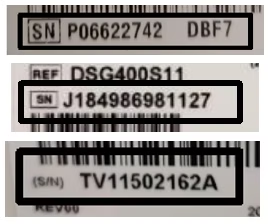
Enter your unit serial number in the field below and click “Check Unit”. You can find your serial number on the label on the bottom of your unit. It is the letters and numbers that follow the SN or S/N on the label.
NOTE: Please verify that you are entering the serial number from your CPAP, BiLevel PAP or Ventilator Device directly and not any attached humidifier (the water reservoir/tank).
Further assistance to locate your serial number can be found here.
If you own more than one device, you will need to complete the registration process for each separately.
Serial Number Examples
* In Australia this is an Urgent Product Defect Correction and in New Zealand this is a Recall for Product Correction